Free synthesizer plugin
KS Ghostform
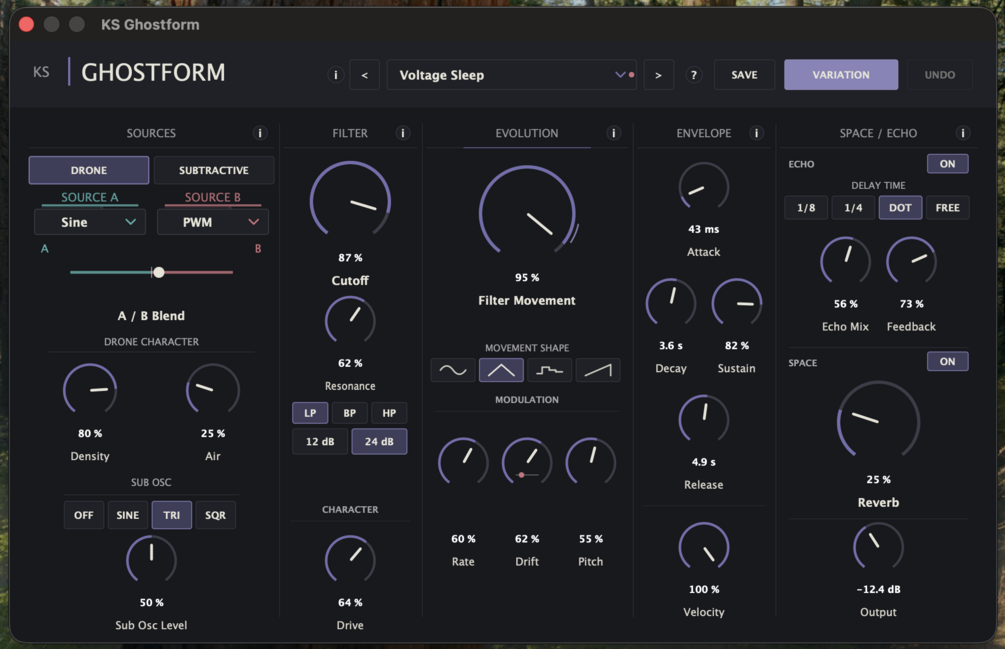
Free evolving drone and string synthesizer for slow harmonic movement, cinematic beds, deep drones, and textured ambient sound design.
Hear Ghostform in action
Demo by Mack Beats Studio · Shared with permission.
YouTube loads only when you press play. Watch on YouTube.
Hear the sounds
Description
KS Ghostform is a free evolving drone and string synthesizer built for slow harmonic movement, cinematic beds, deep drones, and textured ambient sound design.
Two oscillator workflows, a sub oscillator, filter movement, echo, reverb, and a Variation engine make it easy to move from a stable source into more animated, uncertain, or spacious material.
The instrument includes 144 factory presets covering drones, pads, basses, leads, plucks, and experimental textures. It supports host automation and MIDI mapping through your DAW, with no activation or license key.
Product Specifications
- Product type
- Free software synthesizer
- Version
- 1.0.1
- Formats
- macOS AU and VST3; Windows 64-bit VST3
- Preset count
- 144 factory presets
- Sound palette
- Drones, pads, basses, leads, plucks, and experimental textures
- Core engine
- Two oscillators, sub oscillator, filter movement, echo, reverb, and Variation engine
- Automation
- Host automation and MIDI mapping through your DAW
- Interface scaling
- 100%–200%, Fit mode, and Cmd/Ctrl+0 size reset
- Manual
- Ghostform User Manual v1.0.1 (PDF)
- Activation
- No activation or license key
- Delivery
- Free Gumroad download
Requirements
macOS 11 or later: signed and notarized universal AU and VST3 for Apple Silicon and Intel Macs.
Windows: an unsigned 64-bit VST3 ZIP for a compatible DAW; manual installation, no installer. A minimum Windows version has not been specified.
KS Ghostform is a plug-in, not a standalone application.
After installation, restart or rescan plug-ins in your DAW.
Installation
- Download the macOS or Windows archive and the Ghostform User Manual v1.0.1 from Gumroad. Unzip the archive. If updating, back up important projects and quit your DAW before replacing the installed plug-in.
- macOS: copy KS Ghostform.component to ~/Library/Audio/Plug-Ins/Components for AU, or KS Ghostform.vst3 to ~/Library/Audio/Plug-Ins/VST3 for VST3.
- Windows: copy the entire KS Ghostform.vst3 folder to C:\Program Files\Common Files\VST3\.
- Restart or rescan plug-ins in your DAW, then load KS Ghostform on an instrument track. It is not a standalone application.
- Existing 1.0.0 projects and user presets retain their saved values. Select a factory preset again to hear its revised settings.
Need help? Contact support with your product, operating system, and instrument or DAW version.
Release notes
Version 1.0.1 — November 9, 2026. Includes the updated Ghostform User Manual v1.0.1 (PDF).
- Improved quiet factory-preset outliers and quicker entrances in the original mood bank; Pad and Pluck envelope timings are preserved.
- Smoother voice stealing when all eight voices are in use.
- Interface zoom from 100% to 200%, Fit mode, and Cmd/Ctrl+0 size reset.
- Fixes for Variation Undo, preset-name persistence, keyboard loading, typed parameter units, and invalid preset data.
- More robust handling of unexpectedly large audio blocks.
Updating: back up important projects, quit your DAW, replace the installed plug-in, then restart or rescan. Existing 1.0.0 projects and user presets keep their saved values; select a factory preset again to hear its revised settings.
Version 1.0.0 was the initial release on September 25, 2026. The synth still includes 144 factory presets and requires no activation.
Keep exploring
More from Kreativ Sound
Download KS Ghostform free.
Get the full instrument and 144 factory presets, with no activation or license key.